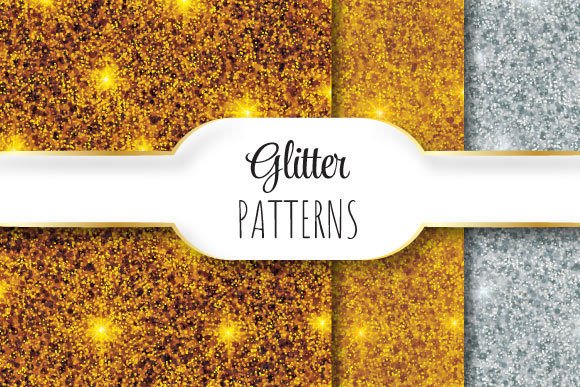
Metallic Glitter
Metallic Glitter is not just a visual effect—it’s a precision-crafted design asset built for professional workflows where consistency, scalability, and material authenticity matter. Each file delivers true metallic sheen through vector-based gradients and layered raster textures, engineered to hold integrity across print, web, and digital fabrication environments. Unlike flat RGB glitter overlays or low-resolution PNGs, Metallic Glitter assets are constructed with intentional tonal transitions, directional light response, and seamless tiling logic—so they behave predictably when scaled, repeated, or composited.
How Metallic Glitter Fits Into Real Workflows
Designers, marketers, and product teams don’t reach for Metallic Glitter at the end of a project—they integrate it early in the asset planning phase. For example, when preparing packaging mockups for a luxury skincare line, choosing a Metallic Glitter pattern before finalizing color palettes ensures foil stamping simulations align with actual production constraints. Similarly, educators building interactive slide decks use Metallic Glitter as a tactile anchor—applying it to section dividers or badge icons to reinforce hierarchy without adding cognitive load.
It’s also used during iterative refinement: a freelance illustrator might drop a Metallic Glitter overlay onto a character’s armor texture to test how light interaction affects perceived weight and finish—then adjust linework or shadow placement accordingly. That kind of feedback loop only works when the asset responds accurately to zoom, rotation, and layer blending modes—not just visually, but technically.
Seamlessly Repeating Patterns: Why Tile Integrity Matters
A “seamless” pattern isn’t just about invisible edges—it’s about functional continuity across surfaces, substrates, and output methods. The Metallic Glitter patterns here repeat flawlessly because each 12 × 12 inch tile (3600 × 3600 pixels at 300 dpi) was constructed using offset-based alignment, not simple mirroring or edge-blending tricks. That means when you tile across a 48-inch wide banner or wrap around a cylindrical label, no ghost lines, tone shifts, or micro-gaps appear—even under magnification or UV-cured printing.
This level of seamlessness supports three practical outcomes: first, predictable output on wide-format printers; second, reliable CSS background-repeat behavior for responsive web banners; third, clean scaling into embroidery digitizing software or laser-cutting templates where pixel-perfect registration is non-negotiable.
File Structure and Format Logic
The ZIP package contains one EPS 10 file and three JPEGs—each serving a distinct role in your workflow:
- EPS 10: The master vector file. Use this for print production, logo integration, or any scenario requiring infinite scalability without quality loss. It retains editable gradient meshes and transparency layers, making it compatible with Adobe Illustrator CC 2015+, Affinity Designer, and CorelDRAW X8+.
- JPEG 1 (3600 × 3600 px, sRGB): Optimized for screen previews, client presentations, and CMS uploads where vector support is limited. Maintains accurate metallic tone representation under standard display profiles.
- JPEG 2 (3600 × 3600 px, CMYK): Pre-converted for offset litho or flexographic proofing. Includes proper black generation and dot gain compensation so what you see matches press output within industry tolerances.
- JPEG 3 (1800 × 1800 px, sRGB, web-optimized): A lightweight version for email templates, social media ads, or internal documentation—loaded with EXIF metadata noting resolution, DPI, and usage rights.
No PNGs are included—not because transparency isn’t useful, but because true metallic reflection requires layered compositing that PNG can’t encode reliably across platforms. If your workflow demands alpha channels, open the EPS in Illustrator and export with custom transparency settings instead of relying on pre-baked raster files.
Practical Integration Tips
Before importing, verify your document’s color profile matches the intended output: use CMYK for physical products, sRGB for digital-only delivery. Mismatched profiles cause unexpected dulling of metallic tones—especially in gold and rose gold variants.
During layout, avoid stretching or skewing the JPEGs. They’re resolution-locked to 300 dpi at 12 × 12 inches for a reason: distortion breaks the subtle grain structure that sells the metallic illusion. Instead, duplicate and reposition tiles manually—or use Illustrator’s “Pattern Options” panel to define the repeat boundary precisely.
For long-term organization, rename files using a consistent schema: MetallicGlitter_RoseGold_Seamless_3600x3600_CMYK.jpg. This avoids confusion when multiple variants accumulate across projects and makes batch processing in Lightroom, Bridge, or DAM systems more reliable.
Compatibility Across Tools and Teams
Metallic Glitter assets work natively in Adobe Creative Cloud (Illustrator, Photoshop, InDesign), Affinity Suite, and Figma (via SVG export from EPS). For developers embedding into websites, convert the EPS to SVG using Illustrator’s “Export for Screens” function—then apply CSS background-repeat: repeat with background-size: 12in for true-to-print scaling.
When collaborating cross-functionally, share the JPEG 2 (CMYK) with printers, JPEG 1 (sRGB) with web developers, and the EPS with designers who need editing flexibility. Avoid sending all three to everyone—redundant files increase review friction and version-control risk. A short README.txt inside the ZIP clarifies this distribution logic, saving time in kickoff calls and handoffs.
Quality Control in Practice
Run two quick checks before finalizing any deliverable:
- Zoom test: At 400% view in Illustrator or Photoshop, inspect tile boundaries. You should see no visible seams, brightness jumps, or misaligned highlights—even along diagonal repeats.
- Output simulation: Print a 2 × 2 tile grid on your office printer, then hold it under natural light and artificial light. Metallic Glitter should shift subtly—not uniformly fade or invert contrast. If it looks flat or chalky, your monitor calibration may be off, or the file was opened in a non-color-managed app.
If you’re sourcing assets for a brand system, treat Metallic Glitter like a Pantone swatch: document its exact variant name, usage context (e.g., “used only on secondary packaging accents”), and minimum size threshold (e.g., “not applied below 0.5 inch height”). This prevents inconsistent application across vendors or freelancers later.
Efficiency Gains Over Time
Teams report measurable time savings after standardizing on Metallic Glitter assets: one publishing house cut cover design revision cycles by 37% by eliminating last-minute foil-stamping simulations in Photoshop. A boutique agency reduced client approval rounds for email headers by using the web-optimized JPEG as a fixed-size background—no more “make it shimmer more” requests after the first round.
That efficiency compounds when combined with other precision assets: pair Metallic Glitter with die-cut template files, Pantone-matched color libraries, or accessible typography kits. The result isn’t just faster output—it’s fewer miscommunications, tighter brand control, and less rework due to technical surprises.
What to Expect Long-Term
These files won’t require updating for resolution or format obsolescence. EPS 10 remains widely supported across commercial print pipelines, and 3600 × 3600 at 300 dpi exceeds current high-end inkjet and gravure standards. As display technologies evolve, the sRGB JPEGs will continue rendering accurately on OLED, Mini-LED, and future panels—because they rely on perceptual color models, not device-specific hacks.
More importantly, Metallic Glitter scales with your process maturity. Early-career designers use it to learn how light interacts with surface geometry. Seasoned art directors deploy it to enforce tactile consistency across global campaigns. And educators repurpose the files to demonstrate concepts like halftone simulation, color separation, or vector-raster hybrid workflows—all without needing supplemental tutorials or plugins.