Dog Digital Papers: Seamless Patterns in AI, EPS, PDF, SVG, PNG & JPEG Formats
What Are Dog Digital Papers?
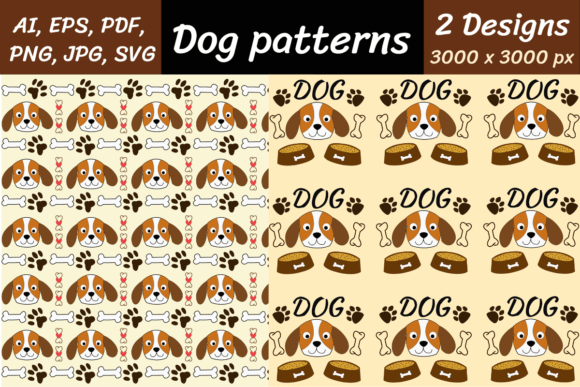
Dog digital papers are high-resolution, repeatable design assets featuring playful, elegant, or stylized dog-themed patterns. Unlike single-image illustrations, these are seamless patterns—meaning they tile infinitely without visible seams or breaks. Designed for versatility and professional use, each pattern is delivered in multiple industry-standard file formats: AI (Adobe Illustrator), EPS, PDF, SVG, PNG, PNG with transparent background, and JPEG/JPG. All files measure 3000 × 3000 pixels, ensuring crisp clarity for both screen display and print production up to large poster sizes.
Why Seamless Dog Patterns Matter in Design & Creativity
Seamless patterns transform how designers, crafters, educators, and small business owners bring personality and consistency to their projects. A dog-themed seamless pattern isn’t just “cute”—it’s a functional design tool. Imagine using it as:
- A custom background for dog training handouts or pet adoption flyers
- A repeating texture on packaging for organic dog treats or boutique pet accessories
- A playful backdrop for social media posts promoting a local dog-walking service
- A printable wallpaper for a children’s veterinary clinic waiting room
- A layered element in Canva, Photoshop, or Procreate for digital scrapbooking or greeting card design
Because the pattern repeats flawlessly, you avoid awkward gaps or misaligned edges—saving hours of manual editing and preserving visual polish across any scale.
Understanding the File Formats: Which One Do You Need?
Not all file types serve the same purpose. Knowing when to use AI, SVG, or PNG transparent helps you work smarter—not harder.
AI & EPS Files: For Scalable Vector Editing
Adobe Illustrator (.ai) and Encapsulated PostScript (.eps) files are vector-based. That means they’re built from mathematical paths—not pixels—so you can resize them infinitely without losing quality. Use these if you’re editing colors, adjusting spacing between motifs, or integrating the pattern into a larger vector layout (e.g., branding kits or signage). Both formats support transparency and are fully editable in Adobe Creative Cloud apps.
PDF Files: Universal & Print-Ready
PDFs preserve vector data and typography while remaining widely compatible. They’re ideal for sharing with printers, clients, or collaborators who don’t use design software. A PDF version of your dog digital paper maintains fidelity for professional offset or digital printing—and often includes embedded color profiles for accurate CMYK output.
SVG Files: Web-Friendly & Interactive
Scalable Vector Graphics (.svg) load quickly, scale responsively, and integrate seamlessly into websites, email templates, and web apps. They support CSS styling and JavaScript interactivity—perfect for animated dog-patterned buttons, loading screens, or dynamic UI elements on pet-related blogs or e-commerce sites.
PNG & PNG Transparent: Clarity With Control
PNG files retain sharp detail and support millions of colors. The PNG with transparent background is especially valuable: it lets you overlay the dog pattern onto photos, gradients, or colored layers without white boxes or unwanted backgrounds. Great for mockups, social graphics, or digital stickers.
JPEG/JPG Files: Fast Loading & Broad Compatibility
JPEGs offer smaller file sizes and universal device support—ideal for quick previews, email attachments, or platforms that don’t accept vector uploads (like some e-learning LMS tools). While they don’t support transparency, their balance of quality and speed makes them reliable for everyday use.
Real-World Uses Across Industries
Dog digital papers go far beyond hobbyist crafts. Here’s how professionals apply them today:
- Educators: Create themed worksheets, classroom posters, or behavior charts with consistent dog motifs—reinforcing learning through visual familiarity.
- Small Business Owners: Design branded merchandise (tote bags, mugs, bandanas) with cohesive dog-patterned labels or tags—no need for costly custom textile printing.
- Content Creators: Build cohesive Instagram story templates, Pinterest pins, or YouTube thumbnails using the same pattern across a content series—boosting brand recognition.
- Print-on-Demand Sellers: Upload SVG or PNG transparent files directly to platforms like Redbubble, Teespring, or Printful to generate products instantly—no design overhead.
- Web Developers: Use SVG versions as CSS background images or inline icons—ensuring fast load times and retina-display readiness.
Clarifying Common Misconceptions
It’s easy to assume “digital paper” means low-res clipart or generic stock imagery. That’s not the case here. These aren’t isolated dog icons—they’re intentionally engineered seamless patterns, crafted with balanced rhythm, intentional negative space, and harmonious color palettes.
Another misconception: “I only need one format.” In reality, having all formats future-proofs your purchase. Today you might need a PNG for Canva—but tomorrow, you may switch to Figma (which imports SVG) or order printed fabric (requiring AI/EPS). Owning the full suite eliminates delays, licensing questions, or re-purchasing later.
Also note: These files are not AI-generated “dog art” in the sense of generative image models. While “dog AI” may refer to artificial intelligence used in pet tech (like health monitoring or breed identification), these digital papers are human-designed, professionally curated assets—optimized for creative control, not algorithmic randomness.
Technical Notes Before You Download
Your download arrives as a ZIP archive containing all seven formats per pattern. To access the files:
- Ensure your device has unzipping software installed—such as WinRAR, WinZip, or the built-in extraction tools in macOS and Windows 10/11.
- Right-click the ZIP file and select “Extract All” (or equivalent).
- Organize the folders by format for quick access—many designers create subfolders like /Vectors/, /Web/, and /Print/.
All files are pre-tested for compatibility with current versions of Adobe Creative Suite, Affinity Designer, Figma, Cricut Design Space, and Silhouette Studio. No fonts or external links are required—everything is self-contained.
Why High Resolution (3000 × 3000 px) Makes a Difference
Resolution determines flexibility. At 3000 × 3000 pixels, these patterns support:
- Print at 300 DPI up to 10 × 10 inches—ideal for posters, banners, or fabric swatches
- Retina displays and 4K monitors without pixelation
- Cropping or zooming in for detail-focused uses (e.g., isolating a single paw motif as a watermark)
- Use in multi-layered compositions where scaling down preserves anti-aliasing and edge clarity
Lower-resolution alternatives may look fine on a phone screen—but fail dramatically when scaled for wall decals or trade show backdrops. This resolution ensures longevity across evolving project needs.
Get Started Today—Download Your Dog Digital Papers
Whether you're launching a pet influencer brand, designing a school project about animal companionship, or building a premium product line for dog lovers, these seamless dog digital papers deliver immediate creative value. With full format coverage, professional-grade resolution, and thoughtful pattern design, they bridge inspiration and execution—without compromise.
Buy now, unzip, and start creating. Your next dog-themed design is just one click away.