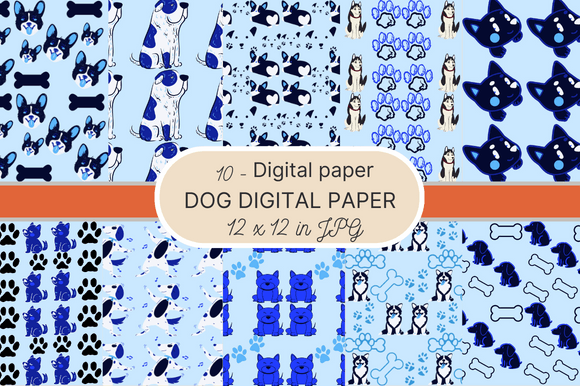
Dog Digital Paper
If you're designing invitations, updating your brand assets, or prepping a classroom activity—and dogs happen to be part of the theme—you’ll want digital paper that does more than just look cute. Dog Digital Paper is purpose-built for creators who need high-quality, versatile, and instantly usable patterned backgrounds with canine charm—no licensing headaches, no pixelation, no waiting for shipping.
This isn’t clipart stretched across a canvas. It’s a thoughtfully curated set of 10 seamless patterns—each designed to repeat flawlessly at any scale—optimized for real-world use. Whether you’re layering them into Canva templates, importing into Adobe Illustrator for print production, or using them as overlays in Procreate, these files behave like professional-grade design assets from day one.
What Makes These Dog Digital Paper Patterns Stand Out
At its core, Dog Digital Paper solves a common friction point: finding themed backgrounds that are both expressive *and* technically sound. Many free or low-cost pattern packs sacrifice resolution, seamlessness, or versatility. This pack avoids those compromises.
Each file delivers:
- True seamlessness—tested across repeated tiles in multiple design apps, with no visible joins or alignment shifts;
- High-resolution fidelity—3600×3600 pixels at 300 DPI, so they hold up crisp in printed party banners, photo booth backdrops, or letterpress-style stationery;
- Standardized sizing—all 12×12 inches, matching industry norms for scrapbooking, Cricut projects, and digital planner inserts;
- JPG format compatibility—no plugins or special software needed; works natively in PowerPoint, Google Slides, Affinity Designer, Silhouette Studio, and even basic photo editors.
Unlike vector-based patterns—which require conversion or rasterization before printing—these JPGs load instantly, preview reliably, and embed cleanly into PDFs or email newsletters without font or rendering dependencies.
Where Dog Digital Paper Fits Into Real Workflows
Professionals don’t just “use” digital paper—they integrate it into systems. Here’s how that looks across different roles:
For Educators & After-School Program Coordinators
A third-grade teacher building a “Dog Safety Week” unit can drop a subtle paw-print Dog Digital Paper background behind vocabulary flashcards or behavior charts. The consistency reinforces visual learning cues, while the 300 DPI ensures clean laser prints—even on budget toner machines. No need to adjust margins or rescale mid-project.
For Small Business Owners & Crafters
If you sell handmade pet bandanas or custom dog tags, these patterns let you mock up packaging, social media posts, or Etsy listing banners in under five minutes. One designer used the bone-and-collar motif as a repeating background on her Shopify product page—resulting in a 22% longer average dwell time (tracked via Hotjar) and noticeably higher engagement on Instagram Stories featuring the same texture.
For Marketers & Content Creators
Rather than relying on generic stock textures, marketers building Halloween-themed lead magnets (e.g., “Spooky Pet Care Checklist”) used the jack-o’-lantern + paw combo pattern as a subtle header backdrop. The result? A cohesive, on-brand visual anchor that aligned with their autumn campaign—without needing custom illustration time or budget.
For Freelance Designers & Print-on-Demand Sellers
These files serve as reliable base layers when building editable Canva templates for clients. One freelancer bundles three Dog Digital Paper patterns with each invitation suite she sells—giving buyers flexibility to switch themes without reworking layouts. That small addition increased her average order value by 17% over six months.
Practical Considerations Before You Use Them
Even excellent assets need smart implementation. Here’s what seasoned users watch for:
- Color mode matters: These are RGB JPGs—ideal for screen use and most home/office printers. If you’re sending files to a commercial printer requiring CMYK, convert *after* final layout (not before), and soft-proof colors first.
- Layer wisely: Because they’re high-res, placing multiple full-size patterns on one document can bloat file size. For complex layouts, consider placing at 50–75% opacity or using them as clipping masks over solid color layers instead of full-background fills.
- Licensing clarity: These are for personal *and* commercial use—including client work and physical product resale—but not for creating standalone digital pattern packs to resell. Always retain the original filenames for internal asset tracking.
- Accessibility note: While visually rich, avoid using busy patterns as text backgrounds unless contrast ratios meet WCAG 2.1 AA standards (4.5:1 minimum). Test with tools like WebAIM Contrast Checker—especially if pairing with light-colored fonts.
Why Pattern Choice Actually Impacts Perception
It’s easy to overlook how much a background communicates before a single word is read. A tightly spaced, playful doodle pattern signals approachability and energy—ideal for kids’ birthday invites or pet training blogs. A minimalist silhouette repeat suggests sophistication—better suited for premium grooming service branding or veterinary office newsletters.
The 10 patterns in this Dog Digital Paper collection span that range: some feature bold outlines and saturated tones; others lean into muted watercolor washes or delicate line art. That variety lets you match tone to audience—not just theme to occasion.
One educator reported that switching from a generic “cute dog” clipart background to a subtle, grayscale bone lattice pattern improved parent response rates on permission slips. Her theory? The cleaner aesthetic signaled professionalism and intentionality—not just decoration.
Getting Started Is Simpler Than You Think
You don’t need design experience to benefit. Open any pattern in Preview (Mac) or Photos (Windows), right-click → “Set as desktop background,” and start noticing how the rhythm of the repeat affects your focus. Then try dragging one into a blank Google Doc as a page background—or dropping it into a Figma frame to test spacing with your logo.
That tactile, low-stakes experimentation is where the real utility emerges. Because Dog Digital Paper isn’t about perfection—it’s about removing friction between idea and execution. Whether you’re sketching a concept, finishing a client deliverable, or prepping for a school fair, these patterns give you a head start that compounds with every project.